
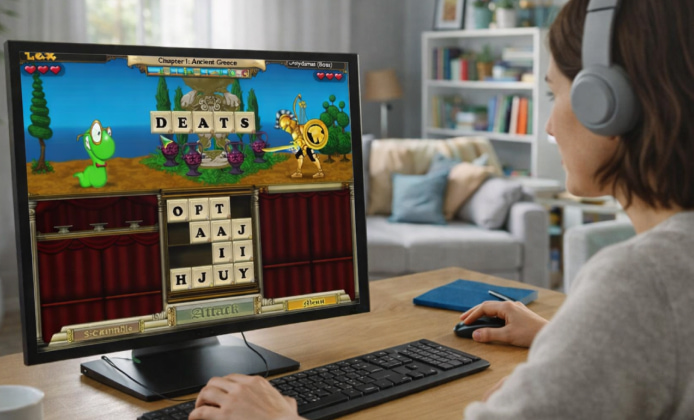
Word-game fans still come back to Lex and his quirky enemies because the battles reward vocabulary, planning, and a bit of luck. If you’re hunting for safe ways to play today, the key is separating what’s officially available from what’s community-made while keeping your device protected and your download habits clean.
First, a Quick Reality Check About “Free”
People often type Bookworm Adventures for free game into search bars when they’re feeling nostalgic, but the official availability of older PopCap titles can vary by store and region over time.
When you see claims like Bookworm Adventures play online for free in random listings, treat them as “search intent,” not proof because the publisher hasn’t historically offered an official browser version of the Adventures RPG line in the way many modern games do.
Option 1: Use a Legitimate Demo or Trial Build
Some players look for Bookworm Adventures free to download as a full installer, but the most defensible “free” route is usually a demo/trial that was distributed for promotion.
- Prefer reputable archives that clearly label the file as a demo/trial and provide basic file details (size, filename, date).
- After downloading, scan the installer with your antivirus and avoid “bundle” installers that push extra software.
- Use a standard Windows user account (not admin) for older game installs when possible.
A good rule: if a “free” download page forces suspicious extensions, password-protected archives, or multiple redirect buttons, close it and look for a cleaner source.
Option 2: If You Already Own It, Make Your Old Copy Usable
Many people simply want to play Bookworm Adventures for free because they already paid years ago so the goal becomes installing a legitimate copy on a modern PC without headaches.
- Try compatibility mode (Windows 7 or XP SP3) and run as administrator only if the game fails to write save files.
- Install to a simple folder like
C:\Games\BookwormAdventuresto avoid permissions issues. - Back up saves after your first successful launch.
It also helps to know that Bookworm Adventures Deluxe has been reported as delisted on Steam, so relying on “buy it now” links may lead to dead ends even if older community pages still exist.
Option 3: Play Something Similar in Your Browser (Not the Same Game)
To scratch the itch without installing anything, some users try play Bookworm Adventures online for free, but the closest official-ish browser-friendly alternative is usually the original Bookworm rather than the Adventures RPG spin-off.
If you just want a quick word-session, the phrase Bookworm Adventures for free online often leads people to browser ports of Bookworm (not Adventures), which can still be a satisfying warm-up for vocabulary and pattern-spotting.
Option 4: Community Recreations and Fan Projects
You may run into “rebuild” projects when searching Bookworm Adventures online for free, and some of these are open-source attempts to recreate the feel in a browser while acknowledging the original game’s legacy.
Just keep expectations realistic: fan projects can be fun experiments, but they may not match the original content, balance, or progression systems.
Is Bookworm Adventures Actually Free-To-Play?
It’s easy to assume Bookworm Adventures free-to-play is a real official model, yet the series was traditionally sold as a premium PC game (often with demos), not built as a modern F2P service with ongoing live updates.
Safety Checklist Before You Install Anything
- Download only from sources that clearly state what the file is (demo, trial, installer) and avoid “cracked” labels.
- Scan the file and verify the publisher info if your OS displays it.
- Never disable security features to run an old game.
- Use an offline installer only if it comes from a trustworthy archive and you understand what you’re installing.
Comparison Table: What “Free” Can Mean in Practice
| Route | Cost | What you get | Best for |
|---|---|---|---|
| Demo / trial build | Free | Limited content, quick nostalgia | Testing if it runs on your PC |
| You already own a disc or old license | Free to reinstall | Full game, if your copy is valid | Long playthroughs |
| Browser-based Bookworm (original) | Usually free | Word puzzle sessions (not Adventures RPG) | No-install casual play |
| Fan recreation projects | Often free | Inspired experience, varies in completeness | Experimenting and curiosity |
Tips to Make the Gameplay Feel Great Again
- Turn on “large text” options if available, and increase your Windows scaling to reduce eye strain.
- Keep a small personal word list: prefixes, suffixes, and high-value letter combos speed up battles.
- When you’re stuck, build shorter words to cycle tiles and fish for better letters instead of forcing a long word.
FAQ
When someone says Bookworm Adventures for free, they may mean a demo, a re-install of a copy they already own, or a legal alternative that captures the same vibe so it helps to decide which scenario fits you first.
If you see a headline like Bookworm Adventures play for free online, consider checking whether it’s actually the original Bookworm in a browser, because that’s the version most commonly offered as instant-play on web portals.
And if a page promises free Bookworm Adventures no download, remember that true “no-download” play is typically browser-based and for this franchise it’s more often the classic Bookworm than the Adventures RPG editions.


 How to Play Bookworm Adventures on PC (Windows Installation Tips)
 Bookworm Adventures Game: A Word-Building Quest With Classic RPG Charm
 Bookworm Adventures Full Version: A Complete Guide to Playing Ana Installing Game
 How to Play Bookworm Adventures for Free: Smart Setups and Fun Alternatives
 What Is Bookworm Adventures and How to Play?
 Best Games Similar to Bookworm Adventures
